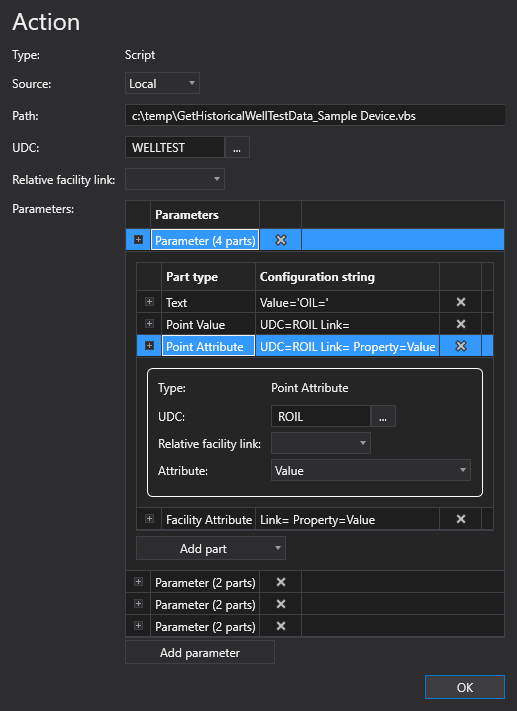
The Script action type is used to run a specified VB script that will process well test data and produce the values needed for the well test record. See Processing and Storing Well Test Results for more information about how the Well test results are written out to the VHS.
Click the following image for more information:
|
|
| Sample Script Action Configuration |
To configure a Script action
A Script action type can be configured from several different places within the well test configuration control. However, the base configuration is always the same. Perform the following steps to configure this type of action, referring to the property definitions below:
The properties for the Script action type are described below.
| Property | Description | XML |
|---|---|---|
|
Type |
Specifies the action type for the action. |
|
|
Source |
Specifies the path to the script file. Options include Local, BSS, or Point. |
|
|
Path |
Specifies a path to a file to perform additional scripted actions, including processing the well test data and producing the values needed for the well test record. For example:
|
script |
|
UDC |
Specifies the UDC for the point to use when posting the well test record. This is an optional override value. The "Result" UDC defined in the UdcDef element will be used by default. E.g., WELLTEST. Click the browse button to open the Select UDC dialog box and select an appropriate UDC. |
|
|
Relative facility link |
Specifies the relative facility tag to use for the action. E.g., Separator Note: The facility tag used as the starting point for the relative resolution depends on where this action type is configured. If the action is defined at a position level, then the base facility tag will be the well facility. If defined at the header level, the base facility will be the header facility. |
|
|
Parameters |
The Script or UIS Command action type may contain optional Parameters, which are used to pass in additional parameters to the action. Each Parameter contains one or more Parts, which are used to build strings that allows further configuration of the parameter. There are four types of Parts, each with associated configuration properties:
To add a parameter
To add a part
|
<Part> |

There are four part types, which are used to build strings that allow further configuration of the parameter. Perform the following steps to configure each type of part:
 to delete any unnecessary part type.
| Property | Description | XML |
|---|---|---|
|
Type |
Specifies the type of value for the part type. There are four part types: Text, Point Value, Point Attribute, and Facility Attribute. |
|
|
Value |
Specifies the value to be used for the text part type. |
| Property | Description | XML |
|---|---|---|
|
Type |
Specifies the type of value for the part type. There are four part types: Text, Point Value, Point Attribute, and Facility Attribute. |
|
|
UDC |
Specifies the UDC to use to obtain the value for this point, point attribute, or facility attribute. Click the browse button to open the Select UDC dialog box and select an appropriate UDC. |
|
|
Relative facility link |
Specifies the base facility tag to use to determine the resolved relative facility tag to use for this point, point attribute, or facility attribute. |
| Property | Description | XML |
|---|---|---|
|
Type |
Specifies the type of value for the part type. There are four part types: Text, Point Value, Point Attribute, and Facility Attribute. |
|
|
UDC |
Specifies the UDC to use to obtain the value for this point, point attribute, or facility attribute. Click the browse button to open the Select UDC dialog box and select an appropriate UDC. |
|
|
Relative facility link |
Specifies the base facility tag to use to determine the resolved relative facility tag to use for this point, point attribute, or facility attribute. |
|
|
Attribute |
Specifies a value, a point attribute, or a facility attribute. The available values to use for this field can be found in the CygNet.API Help file under the CygNet.Data.Core > CygNetCoreProperties.CygNetProperty Enumeration section. |
| Property | Description | XML |
|---|---|---|
|
Type |
Specifies the type of value for the part type. There are four part types: Text, Point Value, Point Attribute, and Facility Attribute. |
|
|
Relative facility link |
Specifies the base facility tag to use to determine the resolved relative facility tag to use for this point, point attribute, or facility attribute. |
|
|
Attribute |
Specifies a value, a point attribute, or a facility attribute. The available values to use for this field can be found in the CygNet.API Help file under the CygNet.Data.Core > CygNetCoreProperties.CygNetProperty Enumeration section. |
|
|
|
 to add a new parameter to this action.
 to add a part type and select a Part from the drop-down menu:
